Open to full-time roles
Senior Product & UX Designer

Designing for
Clarity.
Building for Scale.

10+ years designing fintech, banking and enterprise products for millions of users — from RAKBANK in Dubai, to secure travel for 1.5M+ Amazon employees, to developer tooling at Intuit.

View Case Studies → Download Resume ↗
10+
Years exp.
1.5M+
Users reached
30%
MTTR reduced
50%
Booking time ↓
Zohdi Rizvi
Senior Product Designer
Zohdi Rizvi
Brands I’ve designed for
Amazon RAKBANK Xpence KitaabMarket YourStory The Designership
About

Beyond Pixels —
a journey through
design & business.

My journey into design wasn’t a straight path — built on curiosity, problem-solving, and a desire to create impact. During my MBA at IBS Ahmedabad, I co-founded KitaabMarket — my crash course in understanding where design meets business.

Wearing multiple hats — founder, strategist, marketer and designer — taught me that great design isn’t just about aesthetics; it’s about solving real problems.

Zohdi Zohdi Zohdi Zohdi
Fintech & PaymentsRetail Banking Enterprise SaaSDeveloper Tooling AI / LLMDesign Systems 0→1 ProductsUX Research
Experience
Intuit
Sr. UX Designer (Contractor)
Jun 2025 – Present · Bengaluru, India
Redesigned Custom Metrics CRUD — reduced MTTR by 30%
Built Visual Metric Builder — 60% adoption growth in 3 months
Amazon
UX Designer II — Business Travel
Sep 2021 – Oct 2023 · Hyderabad, India
Reduced booking time by 50% for 1.5M+ employees
Grew monthly travellers by 30% in 6 months
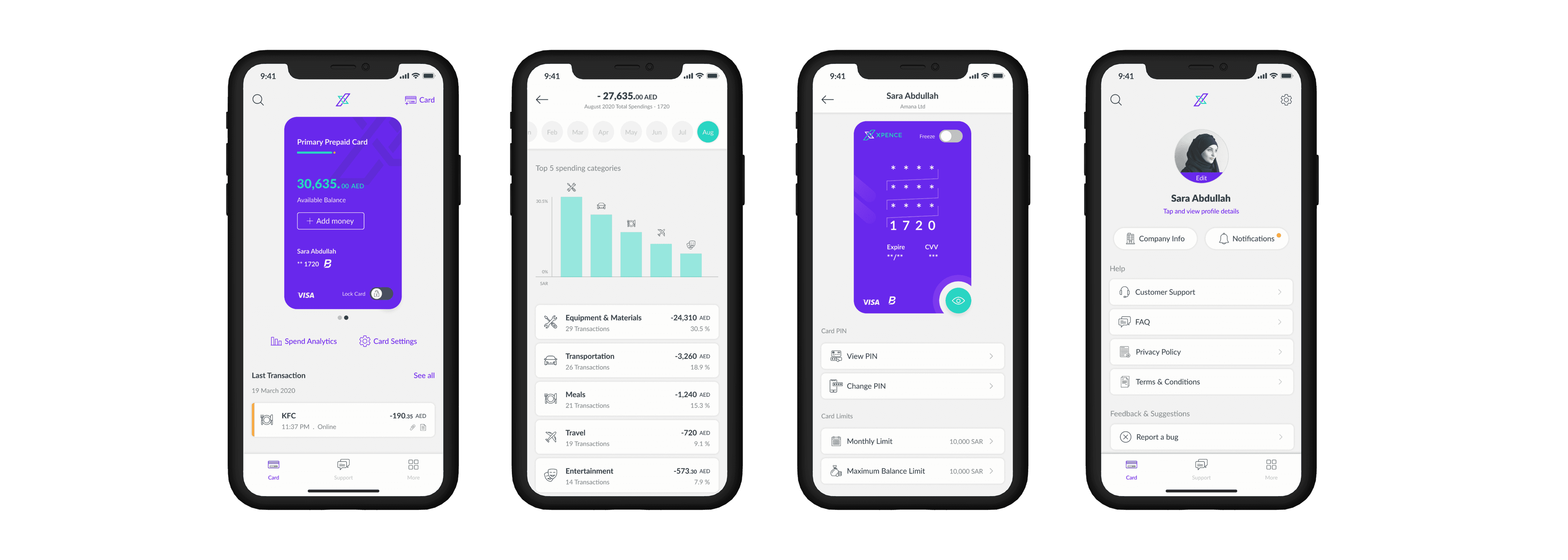
Xpence
Head of User Experience
Jul 2019 – Aug 2021 · Dubai, UAE
Led UX from zero to launch — secured pre-seed funding
Built remote design team saving 70% in staffing costs
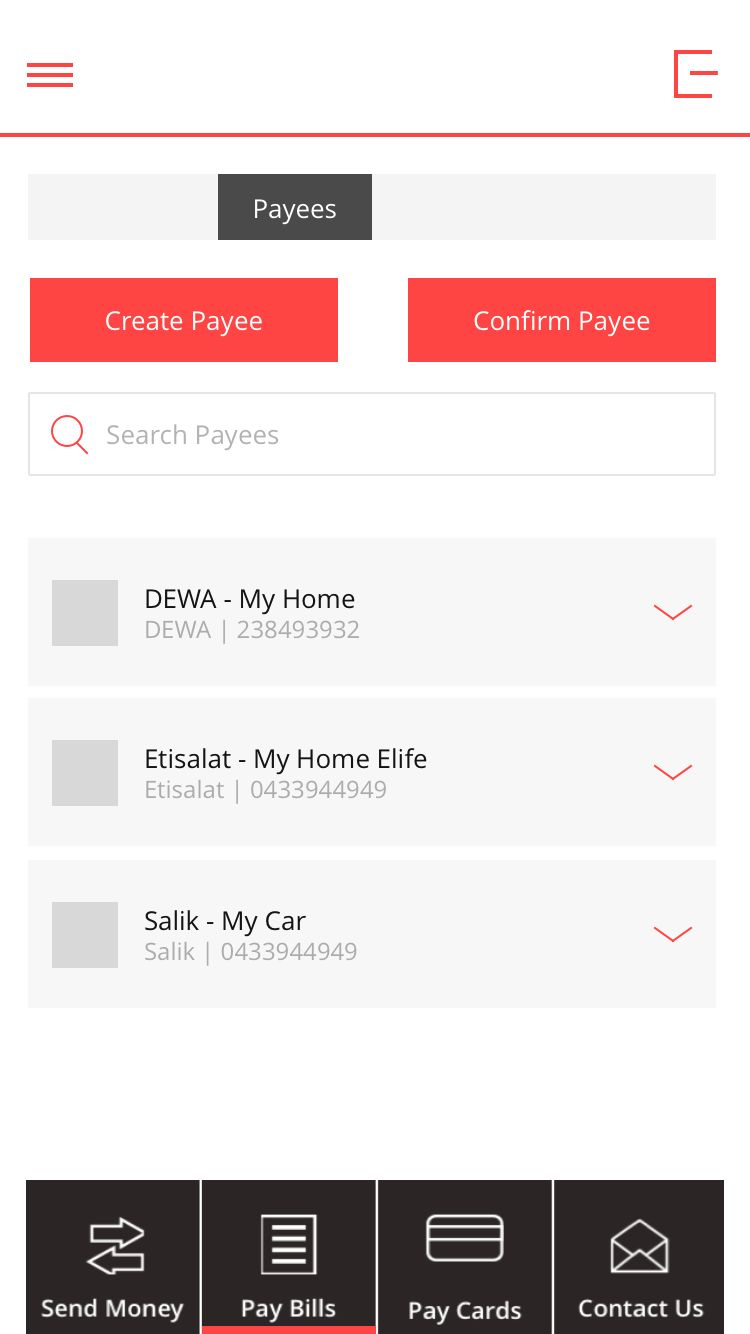
RAKBANK
Senior UX Designer
Jan 2015 – Jun 2019 · Dubai, UAE
Owned UX/UI across web & mobile banking for UAE’s largest banks
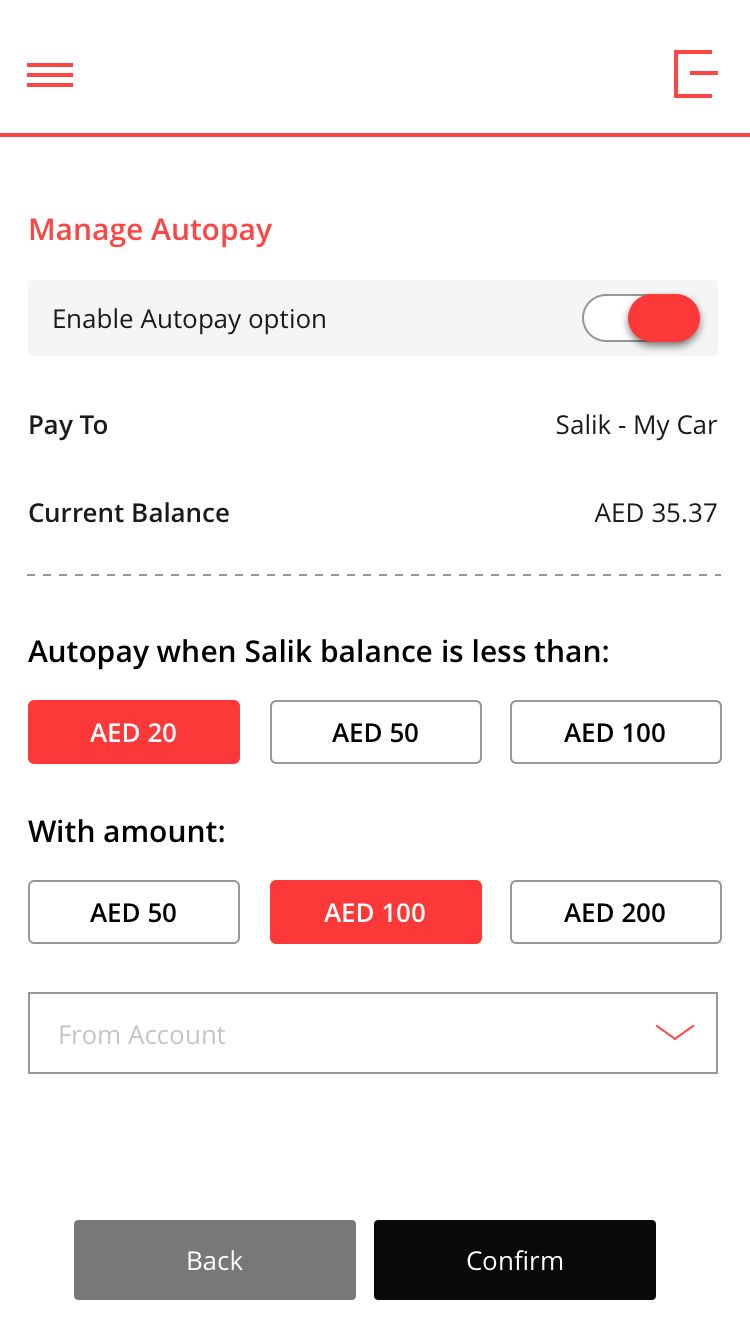
Improved Salik auto top-up experience by 30%
Selected Work

Case Studies

CASE STUDY
Intuit DevX · Sr. UX Designer · 2025

Building metrics
shouldn’t require
a PhD in PromQL.

Eliminated YAML barriers for 1,000+ Intuit developers — designing a dual-path metric builder that reduced MTTR by 30% and drove 60% adoption growth in 3 months.

30%
MTTR reduced
60%
Adoption growth
4.5/5
UT ease rating
VIEW CASE STUDY
CASE STUDY
Amazon · UX Designer II · 2022–2023

Safely Fly-in, Fly-out:
Redesigning Secure Ground
Transportation for Amazon

Turned a 36-hour ordeal into a 15-minute experience — redesigning SGT booking for 1.5M+ employees traveling to high-risk locations worldwide.

50%
Booking time ↓
80%
Instant approvals
30%
More travellers
VIEW CASE STUDY
CASE STUDY
Xpence · Head of UX · 2019–2021

Smart Spend,
Seamless Control:
Gulf’s First B2B Spend Platform

Designed the Gulf’s first smart business spend platform for freelancers and SMEs — from zero to funded startup in 18 months.

Pre-seed
Funding secured
5+
Markets expanded
70%
Staffing savings
VIEW CASE STUDY
Design Philosophy

My Process:
STRIDE

Design is a verb, not a deliverable. Every project follows the same north star: understand deeply, design deliberately, validate ruthlessly.

From stakeholder interviews to post-launch analytics — STRIDE is the framework that keeps me grounded when requirements shift and timelines compress.

STRIDE Process
S
Sense

Deep qualitative & quantitative research, interviews, contextual inquiry.

T
Translate

Insights into clear problem statements and opportunity spaces.

R
Render

Wireframes, visual design, and high-fidelity prototypes tested with real users.

I
Iterate

Via usability testing and continuous improvement based on real feedback.

D
Deliver

Final design to engineers with meticulous handoff — I collaborate until launch.

E
Evolve

Post-launch using UX metrics and analytics to drive continued improvement.

Recommendations

Kind words from
people I’ve worked with.

Recommendation 1
Recommendation 2
Recommendation 3
Get In Touch

Every story has
layers.

Beyond what’s captured in case studies — there are challenges, failures, and breakthroughs that shaped each project. I’d love to share the full story.

Zohdi Rizvi
Home/Work/Amazon SGT
AmazonAmazon · UX Designer II · 2022–2023
Case Study — Enterprise UX · Safety-Critical Design · Dual-Audience System

Safely Fly-in,
Fly-out.

How I redesigned Amazon’s Secure Ground Transportation booking — turning a 36-hour approval ordeal into a 15-minute flow for 1.5M+ employees traveling to high-risk locations worldwide.

My Role
Sole UX Designer · End-to-End Research · Lead Design · Usability Testing · Dev Handoff
Cross-Functional Team
TRM Business Manager · Technical PM · Tech Lead · 2 SDEs
Duration
9 months · 2022–2023
Tools
Figma · Amazon Quip · Maze · Miro · Confluence
50%
Booking time ↓
80%
Auto-approvals
50%
Support tickets ↓
30%
Monthly travellers ↑
Discover
Sep–Oct 2022
Define
Nov 2022
Design
Dec 2022–Mar 2023
Ship
Apr–Jun 2023
Background

The stakes were
not metaphorical.

Amazon employees travel everywhere — including politically unstable regions, active epidemic zones, and areas with severe weather risks. When a VP needs to reach a supplier in Lagos or a data center in Nairobi, they need a vetted, secure ground transportation provider from wheels-down to wheels-up.

That service existed. It was called SGT — Secure Ground Transportation. The problem: the product built to access it was so broken that employees avoided it entirely — using personal arrangements instead and putting themselves at real risk.

“I submitted the form on Monday. It was approved Wednesday. My flight landed Tuesday night. I waited alone at the airport for 14 hours.”

— Amazon Employee, SGT User Interview
1.5M+
Employees eligible for SGT worldwide
36 hrs
Average wait time from submission to approval
40%
Submissions incomplete — required TRM follow-up

How might we streamline the SGT booking process so that low-risk requests get instant approvals, travelers always know their status, and TRM can focus only on complex, high-risk cases?

The Legacy Experience

The form that broke everyone.

15+ fields. Zero conditional logic. No submission confirmation. No eligibility check upfront. Travelers filled it out blind — often incorrectly. TRM spent hours chasing corrections before they could even begin to triage.

Old SGT form
The original SGT intake form — no conditional logic, no eligibility guidance, no status feedback.
Research — Discover Phase

Before touching a wireframe,
I needed to understand both sides.

The SGT problem had two distinct users with conflicting needs: travelers who needed certainty and speed, and TRM analysts who needed accuracy and control. Designing for one without the other would fail both.

12
In-depth interviews
8 frequent travelers across seniority levels · 4 TRM analysts across regions
2
Shadow sessions
Observed TRM analysts processing live requests — revealed the hidden spreadsheet dependency
4
Stakeholder workshops
Process mapping with TRM lead, PM, and Tech Lead to align on constraints before any wireframes
847
Historical requests reviewed
Quip data analysis to quantify completion rates and identify the most common failure points
Stakeholder session Process mapping
Tech constraints Opportunity mapping
Research Synthesis

Three pain clusters,
one broken experience.

Pain #1
The Void
No signal after submission

Travelers submitted and heard nothing for 36 hours. No acknowledgment, no ETA, no eligibility check. The most common support ticket: “Did you even get my request?”

Pain #2
The Form
No guidance, no branching

Every traveler saw every field — regardless of destination. 40% of submissions had missing or incorrect info. TRM spent ~2 hours/day chasing corrections before any triage could begin.

Pain #3
The Scatter
Coordination outside the system

All follow-up happened over email and WhatsApp. Provider confirmation was fragile. Miss one email, and you had no way to verify your pickup was still happening.

The Traveler
Amara — Senior Manager

“I just need to know my driver will be there. Everything else is noise.”

No eligibility feedbackRe-enters Concur data manuallyWhatsApp coordination
The TRM Analyst
Ravi — TRM Analyst

“Half my day is chasing people for information they should’ve given me in the first form.”

Incomplete forms dailyNo triage dashboardManual spreadsheet queue
Key Insight

80% of SGT requests were low-risk domestic trips that required zero TRM review — but the system forced 100% of requests through the same manual queue. The bottleneck wasn’t capacity. It was routing.

Journey Mapping

What the data actually told me.

Affinity map
Affinity mapping — traveler pain clusters1 / 3
Journey map
Journey map — TRM workflow analysis2 / 3
Insights
Insight clustering — opportunity spaces3 / 3
The Transformation

From 36 hours to 15 minutes.

The redesign wasn’t a skin job. It required rethinking the entire approval logic, moving eligibility to screen zero, and building a rule-based auto-approval engine with TRM to handle the 80% of requests that didn’t need human review.

Before
Old SGT form
  • 15+ fields with no conditional branching
  • No eligibility check — travelers discover disqualification after 36 hrs
  • Zero status visibility post-submission
  • All provider coordination via WhatsApp & email
  • 40% of submissions incomplete
After
New SGT eligibility screen
  • Eligibility gate at screen zero — before any effort invested
  • 4-step progressive wizard — only relevant fields shown
  • 80% of requests auto-approved instantly
  • Real-time status tracker with driver assignment confirmation
  • Incomplete submissions reduced to near-zero
Key Design Decisions

The thinking behind the biggest calls.

01 — Eligibility First
Check eligibility before the form — not after 36 hours of waiting

40% of travelers didn’t know if their destination qualified for SGT. Moving the eligibility gate to screen zero eliminated wasted submissions entirely. Rejection surprises dropped to zero.

Alternative considered: surface eligibility inline mid-form. Rejected — travelers would have already invested effort before seeing a disqualifying result, making the experience feel punishing rather than helpful.
02 — Progressive Disclosure Form
4-step wizard with smart conditional branching

Low-risk domestic trips: 2-minute flow. High-risk international: additional security fields unlocked. Originally designed with 12 branch conditions — engineering pushed back on scope. I mapped each branch to its drop-off impact and negotiated down to 4 high-impact branches without losing the core benefit.

Constraint handled: I came back with data showing which 4 branches covered 90% of the friction — turning a scope argument into a prioritisation decision.
03 — Real-Time Status Transparency
Persistent request tracker with stage-by-stage timestamps

A persistent status card showing each stage — Submitted → Under Review → Approved → Provider Assigned. Required partnering with TRM to build auto-advancement logic for low-risk requests, reducing manual TRM involvement to ~20% of requests.

Alternative considered: email-only notifications. Rejected — this replicated the existing failure mode. Travelers already weren’t reading the emails.
04 — TRM Triage Dashboard
Priority-sorted queue, not chronological

Replaced the shared Quip spreadsheet with a risk-sorted request queue. High-risk trips surfaced at top; auto-approved trips removed from view entirely. TRM went from reviewing 100% to ~20% of requests.

Alternative considered: a simple list/table view. Rejected after shadow sessions revealed TRM spent most of their time just identifying which requests were urgent — sort order was the intervention.
What Shipped

Six screens.
Each one solving a specific failure.

Eligibility
Eligibility Check — Screen Zero

Solves for: discovering ineligibility after a 36-hour wait. The gate moves to before any effort is invested.

1 / 6
Form
Smart Multi-Step Booking Form

Solves for: the 15-field monolith causing 40% incomplete submissions. Progressive disclosure shows only what’s relevant.

2 / 6
Details
Conditional Branching — High-Risk Fields

Solves for: low-risk travelers seeing security fields that don’t apply to them, adding confusion and drop-off.

3 / 6
Dashboard
Traveler Dashboard — Real-Time Status

Solves for: the 14-hour airport wait. Live status from submission through to driver assignment in one place.

4 / 6
TRM
TRM Triage Dashboard — Priority Queue

Solves for: TRM manually reviewing 100% of requests. Auto-approval handles 80%; TRM focuses on the 20% that matter.

5 / 6
Confirmation
Provider Confirmation — In-Platform

Solves for: WhatsApp coordination and lost confirmation emails. Pickup details live in the same system the traveler booked through.

6 / 6
50%
Booking Time Reduced

From a 36-hour average to under 15 minutes for low-risk trips. Direct result of eligibility-first + progressive form.

80%
Instant Auto-Approvals

Rule-based routing processed 80% of SGT requests without TRM involvement — enabled by the priority-routing redesign.

30%
More Monthly Travellers

Friction removal unlocked suppressed demand. Employees who had avoided SGT entirely began using it.

50%
Support Tickets ↓

Real-time status eliminated the #1 ticket type — “Did you receive my request?” Measured 6 weeks post-launch.

Learnings

What I’d do
differently.

01
We shipped desktop-only into a mobile-first moment

Travelers land at airports and need to confirm their driver on their phone. I flagged mobile parity in discovery — but didn’t push hard enough when it was deprioritised. I should have returned with usage data, not just a UX argument.

02
Concur integration was a design problem, not just an engineering one

Travelers re-entered trip details already captured in Concur. I accepted this as a technical constraint. In hindsight, a designed auto-fill mockup showing time savings and error reduction could have made the business case for prioritisation.

03
Internal tools users deserve the same rigour as consumer users

TRM bulk-action workflows were clunky post-launch — the TRM dashboard was under-tested relative to the traveler flow. I’ve applied this principle in every project since: the back-office user defines whether a product actually works.

Want the full story?
Let’s talk.

The stakeholder debates, the failed iterations, the engineering negotiations, the moments we almost got it wrong — I’d love to walk you through it all.

Schedule a Call ↗ Next Case Study: Xpence →
Home/Work/Xpence
XpenceXpence · Head of UX · 2019–2021
Case Study — Fintech · 0→1 Product · Design Leadership

Smart Spend,
Seamless Control.

How I led UX from zero to funded launch for the Gulf’s first B2B spend management platform — surviving a full regulatory pivot, building a remote design team from scratch, and shipping a product that reached 5+ markets without a redesign.

My Role
Head of UX · Sole Designer until team build · End-to-End Research · Design Leadership
Team I Built
2 UX Designers · 1 Visual Designer · working with PM · CEO · CTO
Timeline
18 months · MVP Jul 2020 · Web App Phase 2 (2022)
Platform
iOS & Android (day one) · Web App (Phase 2)
0→1
Full product designed & shipped
Seed
Funding secured post-launch
5+
Markets without redesign
70%
Staffing cost saved
Research
Jul–Aug 2019
Pivot
Oct 2019
Build
Nov 2019–May 2020
Launch
Jul 2020
Background

The Gulf was running its economy
on personal bank accounts.

In 2019, the UAE’s freelancer and SME ecosystem was booming — but the financial infrastructure for small businesses was surprisingly primitive. Opening a business bank account required AED 25,000–50,000 minimum balance. Most newer companies were turned away within days of applying.

They weren’t failing to manage money. They were failing to access the basic infrastructure to do it legally and at scale.

“It seems to be impossible for a small company to open a bank account in Dubai. I’ve tried four banks. All rejected us within 10 days.”

— Reddit, r/dubai · 2018 · 847 upvotes
AED 50K
Minimum balance to open a UAE business bank account
3+ yrs
Time to obtain a UAE banking license — the pivot trigger
216
High-intent pre-launch survey responses before a line of code

How might we help freelancers and SMEs in the Gulf manage business expenses with corporate cards and real-time spend visibility, eliminating manual reconciliation and the need for a traditional business bank account?

The Pivot

We wanted to be Revolut.
Reality had other plans.

Xpence’s original vision: become the “Revolut for the UAE.” Then the regulatory walls appeared. Securing a banking license required 3+ years and AED 150M in capital. We pivoted overnight from neobank to B2B spend management platform.

For design, this wasn’t just a scope change — it was a fundamental reframing. The product had to feel like a bank account for businesses that couldn’t get one. Trust, not novelty, became the primary design objective.

MVP scope
MVP product scope post-pivot — prepaid corporate cards + real-time expense tracking + receipt capture.
Research

216 responses before
a single line of code.

We built a “Coming Soon” landing page and ran targeted PPC ads aimed at people actively searching for business banking alternatives in the UAE. 216 high-intent responses — the best kind of signal.

216
PPC survey responses
High-intent users actively searching for a business banking alternative in the UAE
8
In-depth user interviews
Freelancers and SME owners across Dubai & Abu Dhabi — validated the pain hierarchy
4
Competitor teardowns
Spendesk, Pleo, Soldo & Revolut Business — identified gaps specific to MENA context
20+
Usability test sessions
Across 4+ iterations from wireframes to hi-fi — receipt capture flow tested most extensively
Survey 1 Survey 2
Survey 3 Survey 4
Key Insight

SMEs didn’t need expense management software. They needed to feel like legitimate businesses. The real design problem was trust, not tracking. Every product decision flowed from this.

Key Design Decisions

Why the product
looked the way it did.

01 — Card-First Dashboard
Lead with spending power, not account balance

Most fintech dashboards open on a balance. We opened on the card — because for Xpence users, the card was the product. For many, it was the first corporate instrument they’d ever had. Putting it front and centre was a trust signal, not a UI preference.

Alternative considered: balance-first view (standard banking pattern). Rejected — users had no prior balance to anchor on. The card had to be the hero.
02 — RTL-First Architecture
Arabic localisation built in from day one, not retrofitted

Every layout, component, and typography decision was made with RTL in mind from the first wireframe. Leadership questioned the 2-week overhead. When Phase 2 expanded to KSA and Egypt, the system required localisation only — not a redesign. It saved an estimated 6–8 weeks per market.

This is the lesson I now lead with in every multi-market product conversation: localisation as a design system constraint, not a phase 2 concern.
03 — Receipt Capture as the Core Loop
The primary job-to-be-done, not an afterthought feature

Spend analytics had 12% monthly active usage. Receipt capture had 78% task completion. The data was clear: users stayed for capture, not charts. We restructured the entire transaction flow around instant inline capture.

This insight came from usability testing. Early iterations buried receipt upload in a settings-style menu. 6 of 8 test participants couldn’t find it. Moving it inline to the transaction feed fixed the problem in one iteration.
04 — Onboarding as a Trust Mechanism
KYC designed to feel like progress, not interrogation

Fintech KYC flows are typically document-dump screens with no feedback. We designed onboarding as a 3-step progress flow with clear milestones, document acceptance status, and card delivery tracking. First-submission approval on both iOS and Android App Stores.

Prior KYC patterns we studied showed 40–60% abandonment at document upload. Breaking it into labelled steps with progress persistence reduced perceived friction without changing the regulatory requirements.
Design Process

4 iterations.
Each shaped by what users told us.

WF1
Early wireframes — onboarding flow

What changed: card delivery status was missing. Users had no idea when to expect the physical card. Added milestone tracking before v2.

1 / 4
WF2
Mid-fi — card management & transaction flow

What changed: card freeze/unfreeze was buried in settings. Usability testing showed users couldn’t find it under pressure. Moved to the card surface.

2 / 4
WF3
Receipt capture redesign — usability test iteration

What changed: receipt upload was in a separate menu. 6/8 test participants couldn’t find it. Moved inline to the transaction feed — completion jumped from 42% to 78%.

3 / 4
WF4
Pre-handoff — high-fidelity with design system

RTL-first component library finalised, Arabic typography tested, spacing tokens adapted for both directions. Engineering handoff took 2 days, not 2 weeks.

4 / 4
Final Product

Four screens.
Each solving a specific failure.

S1
Dashboard — card-first with real-time spend visibility

Solves for: users who’ve never had a corporate product before. The card is the hero — spending power front and centre, balance secondary.

1 / 4
S2
Transaction feed — inline receipt capture

Solves for: receipt upload abandonment. Capture is one tap from the transaction — not buried in menus. Task completion rate: 78%.

2 / 4
S3
Expense management — category tagging

Solves for: month-end reconciliation chaos. Each transaction tagged at point of capture, not retrospectively in a spreadsheet.

3 / 4
S4
Onboarding — 3-step progress flow with card delivery tracking

Solves for: KYC abandonment and “where is my card?” anxiety. Each step milestoned, progress persists if user drops off mid-flow.

4 / 4
Xpence full product
Seed
Funding Secured

Validated user research and a shipped product contributed directly to securing seed funding. Design de-risked the investor pitch.

5+
Markets Without Redesign

RTL-first design system enabled expansion to KSA, Bahrain & Egypt requiring only localisation — saving an estimated 6–8 weeks of redesign per market.

70%
Staffing Cost Saved

Built a remote design team of 3 at 30% of equivalent agency cost by designing a structured brief and async review process from day one.

78%
Receipt Capture Completion

Inline receipt capture drove 78% task completion — the core retention metric. Analytics features saw only 12% MAU by comparison.

The Team

Built from scratch.
Shipped together.

Team Team celebration
Post-launch celebration with the Xpence CEO and team — Dubai, 2020.
Learnings

Four things I wish
I’d done differently.

01
Agency designers don’t own the product — in-house ones do

Agency quality was high but ownership was low. One exceptional in-house designer from day one would have outperformed three capable agency designers over a 12-month engagement.

02
We launched mobile-only into an office-first workflow

Research showed mobile as the primary capture device — but underrepresented where the management workflow actually happened. The web app arrived in 2022. It should have been in the MVP.

03
Sell the design system in business terms, not design terms

Leadership questioned the RTL-first investment. When Phase 2 expanded to KSA, every hour paid back 3×. I should have made the ROI case upfront, not waited to be proven right.

04
Nail the core job before adding delight

Spend analytics: 12% MAU. Receipt capture: 78% completion. The data was clear early — we just didn’t act on it fast enough. Delight built on a shaky core is expensive decoration.

Want the full story?
Let’s talk.

The onboarding flow scrapped 3 days before dev handoff, the pivot that changed everything, the RTL argument I wish I’d made earlier — I’d love to walk you through it all.

Schedule a Call ↗ Next Case Study: Intuit DevX →
Home/Work/Intuit DevX
DEVXIntuit · Sr. UX Designer (Contractor) · 2025
Case Study — Developer Experience · Enterprise SaaS

Building metrics
shouldn’t require
a PhD in PromQL.

Eliminated YAML barriers for 1,000+ Intuit developers — designing a dual-path metric builder that reduced MTTR by 30% and drove 60% adoption growth within 3 months of launch.

My Role
Sr. UX Designer · End-to-End Design · Usability Testing · Dev Handoff
Team
Natasha (GDM) · Nikhil & Gaurav (Sr. Designers) · Harsh (PM) · Ravi & Ankur (Eng)
Platform
Web — Intuit DevPortal (Internal) · Prometheus / Wavefront
Tools
Figma · Figma Make (AI) · Maze · Miro · Confluence
30%
MTTR reduced
60%
Adoption growth
4.5/5
UT ease rating
5:23
Avg. creation time
Discover
FMH Interviews · PRD Deep-Dive
Architect
Dual-Path Framework
Build
3 Directions · 9 Weeks
Test
9 Participants · Maze + Moderated
Ship
MVP Sep 5 · Handoff Sep 12
1,000+
Developers Impacted
9 wks
Scope Instability Navigated
Both
Deadlines Met on Time
Background

Intuit had thousands of developers.
Zero of them enjoyed metrics.

Inside Intuit’s engineering organisation, the DevX team owns the internal DevPortal through which thousands of engineers instrument, observe, and manage their services. The problem: creating Prometheus recording rules required hand-written PromQL expressions inside YAML files, committed to a repository, with a deployment wait and zero UI feedback.

Most developers skipped this entirely — pushing raw metrics to Wavefront instead, which cost significantly more and produced less signal.

“I’d rather push raw metrics to Wavefront and deal with the cost later than spend 2 hours debugging a PromQL expression that might be wrong anyway.”

— Intuit Developer, FMH Interview · Source: PRD
8+
FMH Interviews
Foundational metrics & health sessions with developers pre-design
9
Usability Tests
Moderated + unmoderated sessions across both user archetypes
3
Design Directions
Native custom, Grafana-embedded, and AI-assisted approaches explored
4
Tools Analysed
Grafana, Datadog, Wavefront, and Prometheus docs evaluated for patterns
The Real Problem

The barrier wasn’t PromQL expertise. It was that the DevPortal offered developers no reason to stay — every metric creation path led outside it. Adoption required removing friction entirely, not just documenting it better.

As a developer, I want to define granular, service-specific custom metrics within the DevPortal so that I don’t need to switch between platforms, deal with fragmented workflows, or suffer delayed issue detection.

Pain Points

Three barriers.
One broken experience.

Pain #1
YAML
GATE
Steep Learning Curve

Creating metrics required YAML + PromQL expertise. Developers without this gave up or copy-pasted expressions they didn’t understand.

Pain #2
NO
UI
No Native Self-Serve UI

There was no UX in Intuit DevPortal for creating, discovering, editing, or deleting Prometheus rules. Everything lived in YAML files.

Pain #3
$$
COST
Low Adoption, High Cost

Developers skipped recording rules entirely and pushed raw metrics to Wavefront — a compounding infrastructure cost with direct KPI impact.

Personas

Not one user.
Two very different ones.

Personas — The Fluent Power User and The Novice User
The Fluent Power User (PromQL engineer) and The Novice User (raw-metric pusher).
The Power User
The PromQL Engineer

“I know PromQL cold. I want to write my expression, validate it, and ship. Don’t make me click through 5 steps.”

Senior Dev / DevOpsKnows YAML + PromQLPain: No validation
The Novice User
The Raw-Metric Pusher

“I don’t know what PromQL means. I push raw metrics because it’s the only thing I know.”

Newer developerNo PromQL knowledgeCost impact: High
Design Timeline

Shifting scope. Tight deadlines.
Both met anyway.

Design Timeline Jul–Sep 2025
Design timeline · Jul–Sep 2025 · Kickoff → MVP → Usability Testing → Handoff
Mid Jul → Aug 25
Kickoff & Shifting Requirements

Three design directions across nine weeks — Custom Native, Grafana-based CRUD, back to Native.

Aug 25 → Sep 5
Rapid MVP Delivery

Delivered MVP CRUD designs (Build with Code) in two weeks. MVP shipped Sep 5.

Sep 5 → Sep 12
Usability Testing

9 participants across moderated & unmoderated sessions. Validated dual-path approach.

Sep 12
Revisions & Handoff

Both deadlines met despite 9 weeks of scope instability.

Design Iterations

Three directions.
One we actually shipped.

Design Iterations
Custom Native Flow → Grafana-based CRUD (ruled out by Eng) → Native MVP + AI chat prototype via Figma Make
01
Native Custom Create Flow → Grafana-Based CRUD

We began with a native flow. Mid-engagement, the ask shifted to explore Grafana-embedded CRUD. We built a complete MVP in a week. Fast execution under ambiguous requirements.

↵ Pivoted
02
Grafana-Based CRUD → Back to Native (Trimmed Scope)

Engineering’s feasibility study ruled out Grafana. We returned to native CRUD with trimmed MVP scope: Build with Code first, Visual Builder to follow.

✓ Shipped Sep 5
03
AI / LLM Metric Creation Assistant — Prototyped, Then Descoped

An AI/LLM-powered chat interface appeared in the PRD as P0. We prototyped three directions using Figma Make (AI) in under a week. Descoped from P0/P1 due to LLM integration complexity.

↻ Prototyped via Figma MakeDescoped from P0/P1
Key Design Decisions

One product.
Built to serve two completely different users.

The central challenge: serving both personas without compromise. The answer — a tabbed dual-path. “Build Visually” and “Build with Code” as equal-status entry points, always visible, always switchable.

01 — Dual-Path Tab Architecture
One UI entry point, two completely different experiences underneath

The instinct was to build separate flows — one for novices, one for power users. Instead, a single tabbed UI keeps both paths visible and equally accessible. Users switch seamlessly; neither persona feels like an afterthought.

Alternative considered: separate onboarding routing via a skill-level quiz at entry. Rejected — developers resent patronising flows. Equal-status tabs let users self-select without being labelled.
02 — Inline Validation over Deferred Feedback
Catch errors at the moment of writing, not after submission

The old workflow: write YAML, commit, deploy, wait, fail silently. The new workflow: syntax errors flagged character-by-character with fix suggestions inline. Power users in UT called this the single most valuable improvement.

Alternative considered: a “validate” button to run checks on demand. Rejected — developers naturally expect IDE-level real-time feedback. A button creates a mental step that inline validation removes entirely.
03 — Live Query Preview Graph
Show the metric output, not just the expression

Writing a PromQL expression with no visual feedback requires mental simulation. Adding a live graph preview — rendering actual data as the expression is built — converts abstract code into concrete output. Reduced average creation time to 5:23.

Technically expensive: required real-time Prometheus query execution on the DevPortal backend. Engineering scoped it in after seeing UT participants visibly struggle to verify their expressions without it.
04 — Visual Builder with Hidden PromQL
Generate valid PromQL automatically — never ask a novice to write it

The Visual Builder translates dropdown selections into PromQL in a read-only preview pane. The developer never writes a character of query language but can inspect what was generated. Drove 60% adoption growth — the novice segment was the untapped majority.

UT finding: even PromQL-fluent users preferred the Visual Builder after trying it. The dropdown interface forces structured thinking — it’s not just a novice path, it’s a faster path for everyone.
Build with Code
For the PromQL Engineer

Direct PromQL entry with syntax highlighting, real-time validation, and error flagging. Designed for speed.

  • PromQL syntax highlighting
  • Inline error flagging with fix suggestions
  • Real-time query preview with live data graph
  • Multi-query support with join operators
Build Visually
For the Novice Developer

Generates valid PromQL automatically — the developer never needs to write a single character of query language.

  • Dropdown-driven function & operator selection
  • Label filter builder with auto-complete
  • Live PromQL expression preview (read-only)
  • Contextual tooltips on every concept
MVP — Build with Code

What shipped on September 5th.

MVP scoped to PromQL code editor with syntax highlighting, inline validation, data source selector, and real-time query preview. CRUD complete.

MVP Build with Code — MacBook showing PromQL editor
MVP: PromQL editor with syntax highlighting · Data source selector · Live query preview graph
Usability Testing · Sep 8–12, 2025

9 participants. 3 findings
that changed the design.

Usability testing sessions
Usability testing · Sep 8–12, 2025 · 9 participants · Avg. ease: 4.5/5 · Avg. time: 5:23
UT participant Slack messages
UT participant anecdotes — Slack messages post-session
Finding #1
Visual Builder Won Over Power Users Too

Even PromQL-fluent users shifted preference to the Visual Query Builder after trying it. It’s not just for novices.

Implication: the novice vs. power-user persona split was a design constraint, not a permanent user reality. The bridge between paths matters more than the paths themselves.
Finding #2
Code Editor Expected IDE-Level Behaviour

Power users expected raw paste support, colour-coded syntax, and inline error flagging. A “prettify” button was added based on participant feedback.

The tell: one participant opened DevTools mid-session and tried to inspect the editor’s codemirror config. Developer tooling users don’t just use UI — they audit it.
Finding #3
Novices Needed More Onboarding Scaffolding

First-time users were unclear on “custom labels” and base vs. derived metrics. Added contextual tooltips with plain-English definitions.

Validated by task failure analysis: 4 of 5 novice participants paused on “label filters” without tooltip assistance. Adding inline definitions reduced time-on-step by ~40%.

“The design was pretty intuitive for custom metric creation. The Visual Query Builder was way better than I had hoped for. This will be a great addition.”

Ujjwal Sharma · Intuit Developer · Sep 11, 2025

“Super convenient to have the metric builder built into the DevPortal. Intuitive UI — easy to grasp for anyone coming from Grafana. Visual Builder provides a list of available functions which is immensely helpful.”

Vaibhav Kant Tiwari · Intuit Developer
UX Success Metrics — Impacts on O11Y KPIs

Metrics that connect
design to the business.

UX Success Metrics
UX success metrics tied to O11Y KPIs: CES Score → improves MTTD · Time on Task → reduces MTTR
4.5/5
CES Score During UT

Target post-launch: 80%+ success rate. More successful creations → faster anomaly detection.

5:23
Avg. Time on Task

Target: 50% reduction from baseline. Less YAML wrestling = more time resolving actual issues.

60%
Adoption Growth

Visual Metric Builder drove 60% user adoption growth within 3 months. Fewer raw metric pushes to Wavefront.

30%
MTTR Reduction

Redesigned Custom Metrics CRUD contributed to a 30% reduction in Mean Time to Resolution.

Learnings

What I carry forward.

01
Scope instability is a design problem, not just a PM problem

The dual-path tab, inline validation — all survived every pivot because they solved the user problem, not the surface requirement. The more unstable the scope, the more important it is to design against user needs.

02
The fastest path to adoption is unblocking the most vocal users first

Shipping the PromQL editor first created internal momentum. The Visual Builder arrived into a warmed ecosystem — not a cold one.

03
Developer tooling demands a different design empathy mode

Consumer product empathy asks “how does this feel?” Developer tool empathy asks “how does this fit into my workflow?” Patronising onboarding loses their trust fast.

04
AI features need engineering scope before PRD P0 labels

The LLM metric creation assistant was compelling in testing but added as P0 without engineering sizing. I should have pushed for feasibility assessment earlier.

Acknowledgements

The team that made
this possible.

DDG/DevX team
Special thanks to DDG/DevX team — Natasha, Anusha, Nikhil, Gaurav, Ravi, Ankur, Harsh, Shailja

Want to see how I navigated
9 weeks of shifting scope?

Three design directions. Two deadlines. One product that served two completely different users without compromise. I’d love to walk you through the full story.

Schedule a Call ↗ ← Amazon SGT